Is this your app? Claim this page to add your own description, links and contact info. It's free. →
Version
2.5.509
Size
0 Bytes
Updated
3 months ago
Released
30 Aug 2010
Screenshots


Description
iK - Sophisticated appearance of your calendar...
iK is NOT just another calendar application! iK provides an easy and handy way to track and manage all calendar events that you have created on your iPhone/iPad or Mac. So, all the standard Apple calendar features such as alerts will work regardless of whether or not iK is running and without using the Apple Push Notification service.
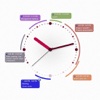
iK displays events around the clock, which is much more intuitive than observing event lists that other applications offer. iK supports multiple calendars, so you can choose to display your work events, your family events, or even both if needed.
The intuitive interface makes iK usage very simple. Use a few buttons to navigate through the events. Double-tap an event label to edit or delete the event. Choose Tools > New Event to create a new one.
The built-in standard interface for editing events, the same that the iPhone Calendar application uses, lets you start using iK immediately, without having to read the manual. Whats more, every change you made to calendar events on your Mac appears on your iPhone after synchronization.
iK is coming out with three clock skins and backgrounds. You can change the clock size and customize the clock appearance to suit your specific needs. For example, you can enable the Work Time Highlight to dim the non-working hours on the clock face, or you can turn on a tick-tack sound to make the clock more realistic.
HINT: We recommend that you use iK in landscape orientation because the iPhone screen is not wide enough.
Estimates
Availability
Devices
iPodTouchSecondGen
iPhone3G
iPhone3GS
iPadWifi
iPad3G
iPhone4
iPodTouchThirdGen
iPodTouchFourthGen
iPad2Wifi
iPad23G
iPhone4S
iPadThirdGen
iPadThirdGen4G
iPhone5
iPodTouchFifthGen
iPadFourthGen
iPadFourthGen4G
iPadMini
iPadMini4G
iPhone5c
iPhone5s
iPadAir
iPadAirCellular
iPadMiniRetina
iPadMiniRetinaCellular
iPhone6
iPhone6Plus
iPadAir2
iPadAir2Cellular
iPadMini3
iPadMini3Cellular
iPodTouchSixthGen
iPhone6s
iPhone6sPlus
iPadMini4
iPadMini4Cellular
iPadPro
iPadProCellular
iPadPro97
iPadPro97Cellular
iPhoneSE