Is this your app? Claim this page to add your own description, links and contact info. It's free. →
Version
1.6.0
Size
0 Bytes
Updated
4 months ago
Released
25 Aug 2015
Screenshots




Description
The brand new app, Canon PRINT Inkjet/SELPHY has been recently released in order for you to enjoy PIXUS and MAXIFY capabilities more conveniently. The new app, Canon PRINT Inkjet/SELPHY is highly recommended. The latest version of PIXUS/MAXIFY Printing Solutions has instructions on how to install the new Canon PRINT Inkjet/SELPHY. You can install the new Canon PRINT Inkjet/SELPHY app from the latest version of PIXUS/MAXIFY Printing Solutions. If you would like to continue using the PIXUS/MAXIFY Printing Solutions app, please click "No" at the first prompt. Scanned data remains in the PIXUS/MAXIFY Printing Solutions app after installing the new Canon PRINT Inkjet/SELPHY app.
PIXUS/MAXIFY Printing Solutions (Inkjet Print) is a free application that allows iPad, iPhone or iPod touch users to enjoy a variety of PIXUS/MAXIFY printing capabilities.
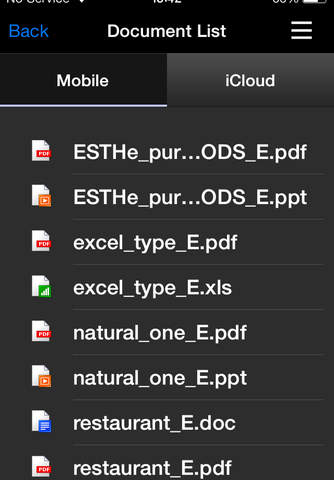
In addition to wireless printing*1 for photos & documents*2 from smart devices, you can also scan & save photos & documents to your device.
If you would like, you can monitor Print Status (e.g. ink remaining) and view the online manual.
Key features
-Easily to choose paper size and media type
-Easily to print up to 20 different photos
-Bordered or borderless prints
-Seamlessly scan & save photos as PDF or JPEG
-Print MS OfficeR docs and PDF files
-Additional mode to optimize layout for document printing*3*4
"Automatically searches the wireless network for printers when you open the app."
-Online manual for your reference*5
-In case of low ink, you can check ink and buy online. Energy-saving & silent mode settings are also available*5
*1: In order to access PIXMA/MAXIFY printing capabilities, printers may be required to connect to a wireless network
*2: The optimized print-mode is recommended if document data is not displaying properly on the device.
*3: Appropriate printer-settings required
*4: Function not available in certain countries or regions.
*5: Some printers are NOT available
Supported printers
Canon Inkjet Printers
PIXUS MX450 series, MX520 series, MX720 series, MX920 series, PRO-1, MG3500 series, MG5500 series, MG6400 series, MG6500 series, MG7100 series, MX470 series, MX530 series, iX6800 series, iP8700 series, MG7500 seires, MG6700 series, MG5600 series, MG2900 series, iP110 series, MAXIFY MB2000 series, MB2300 series, iB4000 series, MB5000 series, MB5300 series, PIXUS PRO-10S, PRO-100S, MX490 series
Smart-devices
Devices running iOS 7.0 or later
------------------------------
Supported languages
Japanese, English, Czech, Danish, Dutch, Finnish, French, German, Italian, Norwegian, Polish, Portuguese, Russian, Spanish, Swedish, Turkish, Korean, Simplified Chinese, Traditional Chinese
Media types*6
Plain Paper, Photo Paper Plus Glossy II, Photo Paper Pro Platinum, Photo Paper Plus Semi-gloss, Photo Paper
Paper sizes*6
Letter (8.5"x11" 21.5x28 cm), A4, A5, 4"x6" (10x15 cm), 5"x7" (13x18 cm), 8"x10" (20x25 cm), A3, A3+ (13"x19" 33x48 cm ), 10"x12" (25x30 cm)
*6: Media types & paper sizes depend on your printer specification